How to Get Google Reviews Without Customer Phone Numbers or Emails
No customer contact list? You can still get a steady stream of Google reviews. Here's how to collect reviews in the moment and capture contacts where you can.
Most advice about getting Google reviews assumes you have a way to reach your customers — a phone number to text, an email to send a request to. But plenty of businesses don't. A restaurant serving walk-in diners, a coffee shop, a retail store, a food truck — you serve people all day and never capture a single contact detail. So how do you get reviews when you can't follow up with anyone?
The good news: you absolutely can. You just have to shift your strategy from asking later to asking in the moment — and quietly capture contacts at the few points where you can. Here's how.
Why the "send a review request" approach breaks down
The standard playbook is: collect your customer's number or email, then send them a friendly review request afterward. It works well for businesses that book appointments or take orders — salons, dentists, auto shops — because they capture contact info as part of doing business.
But for a walk-in business, that contact never gets collected. The customer pays, enjoys their visit, and leaves — and you have no way to reach them again. Asking them to review you later isn't an option, because there is no "later" contact. So the whole strategy has to move to a different moment: while they're still with you.
Strategy 1: Capture reviews in the moment with a QR code
This is the single most effective tactic for a no-contact business. A QR code turns "I'll review them later" (which never happens) into "I'll do it right now" (which does). Put a review QR code where customers naturally have their phone out and a moment to spare:
- On the receipt or check — the moment of payment, when they're satisfied and reaching for their phone.
- On table tents or stickers — visible throughout the visit.
- On a small card handed with the bill or the bag.
- On a clean sign near the register or exit.
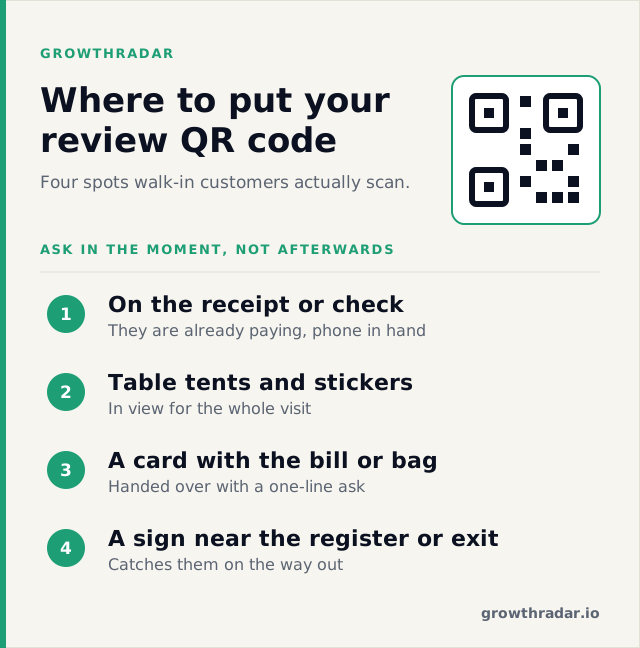
One scan takes them straight to your review page, on their own phone, while the experience is fresh. Keep the sign simple — one clear ask, one QR code. Cluttered signs with five different review-site logos convert worse than a single focused prompt.
Strategy 2: Make the ask, briefly and genuinely
A QR code works far better when a real person points to it. Train your team to make a short, warm ask at the right moment — right after a customer compliments the food, service, or experience: "So glad you enjoyed it! If you have a second, there's a QR code right there to leave a quick Google review — it really helps us." No pressure, no script that sounds robotic. Just a genuine nudge at the peak of a good experience.
Strategy 3: Capture contacts at the few points where you can
You can't capture every customer's details — but most walk-in businesses have a handful of moments where contact info naturally comes up. Use those to build at least a partial list you can follow up with:
- Online orders and reservations — these come with a phone number or email. Anyone who orders online or books a table can get a review request afterward.
- Guest WiFi — if you offer WiFi, a simple login that asks for an email captures contacts from people who'd otherwise leave no trace.
- Loyalty or rewards signups — "join our list" programs capture details from your regulars.
For these customers, the standard "send a review request after their visit" approach works again — because now you do have a way to reach them.
Strategy 4: Respond to the reviews you get
Every review you earn is worth more when you reply to it. A warm thank-you to a good review and a calm, professional response to a critical one both show future customers you're engaged and you care — and Google favors active, responsive profiles. Responding also makes people slightly more likely to leave reviews in the first place.
The one rule: never buy or incentivize reviews
It's tempting to offer a free coffee or a discount for a review — especially when reviews are hard to come by. Don't. Offering incentives in exchange for reviews violates Google's policies and can get your reviews removed or your profile penalized. Ask freely, make it effortless with a QR code, and let the reviews be honest. Genuine reviews are the only ones that build real trust.
Frequently asked questions
How do I get reviews if I don't have customers' contact info?
Capture reviews in the moment with a QR code on receipts, tables, and counters, and make a brief genuine ask at the peak of a good experience. Separately, capture contacts where you can — online orders, reservations, WiFi logins — so you can follow up with those customers.
What's the best place to put a review QR code?
On the receipt or check, where customers are already paying and have their phone out. Table tents and a clean sign near the register work well too.
Can I get reviews from walk-in customers?
Yes — the key is asking in the moment (via a QR code and a quick verbal ask) rather than trying to reach them afterward, since you have no way to contact them later.
Turn every visit into a review
You don't need a contact list to build a steady stream of Google reviews — you need to make reviewing effortless in the moment. Generate your business's direct Google review link and a printable QR code with our free Google Review Link Generator — put it on your receipts, tables, and counter, and turn happy customers into reviews before they walk out the door. And if you'd like your reviews and marketing handled automatically, that's what GrowthRadar does for local businesses.